Available Available in Matter now

Letters and letterhead for client correspondence

Matter turns a letter template into a generated PDF on the case, with the practice letterhead around it and the client details resolved from the record rather than retyped.

Staff write the letter once as a template, bind it to the people on a case, and generate a branded PDF that lands in the case documents ready to send.

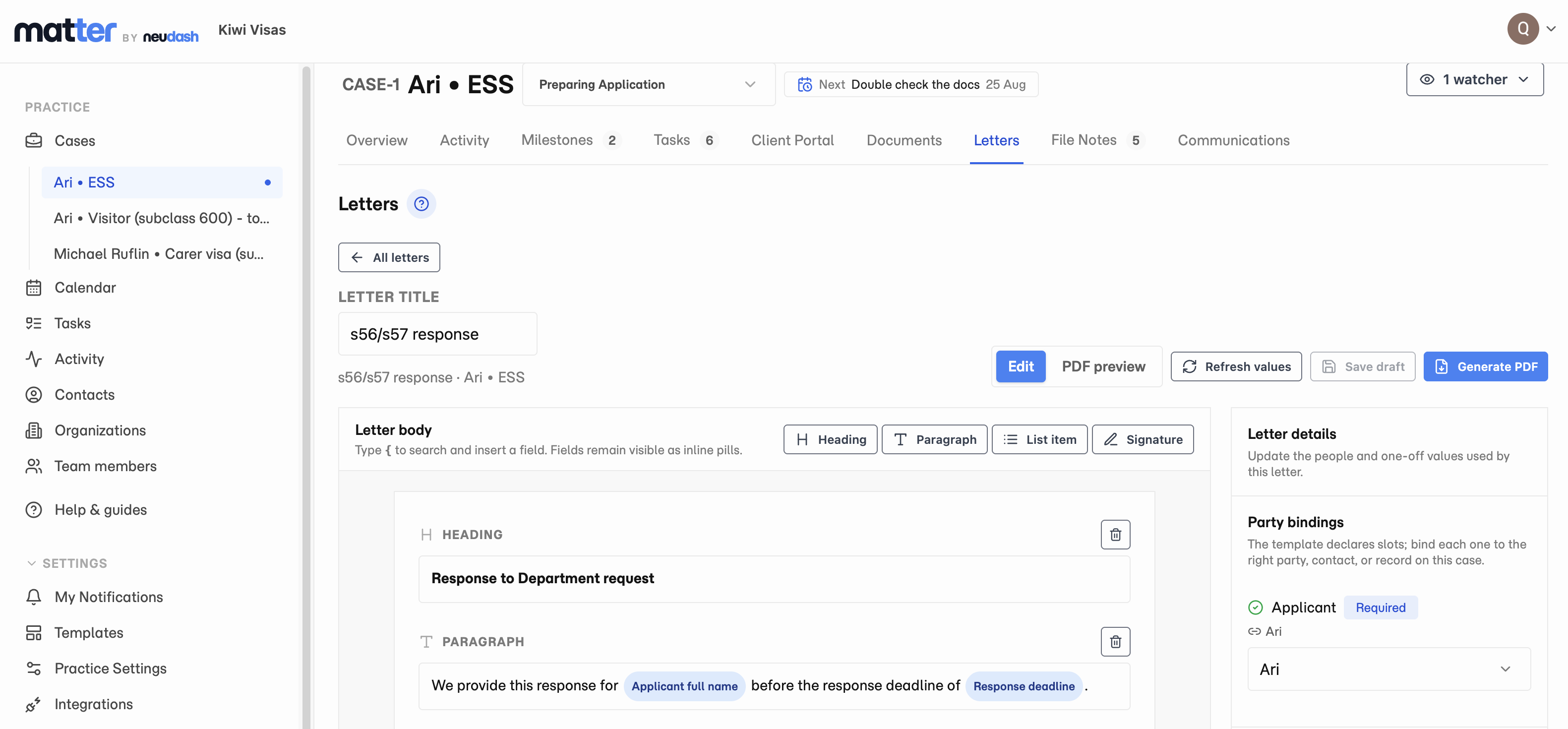
The Matter letter workbench on a case, showing the letter body with client details inserted as fields, and the party bindings panel beside it.

What it does

Letters give a practice one place to write client correspondence and produce it as a branded PDF on the case.

You author a letter template once. Inside a matter, you pick that template, connect it to the actual people involved, and generate the PDF. Matter fills in the details from the record itself, so the letter is not assembled by copying names, dates, and reference numbers out of the file and into a word processor.

Where it shows up in the workflow

Letter templates live in the Templates area of the workspace. Every template is versioned, so an edit keeps the earlier revision rather than overwriting the only copy.

Authoring starts with subjects rather than fields. You declare who and what the letter refers to, giving each subject a role name and a type: a contact, an organisation, an agent, the case, or the firm. The fields you can insert are then whatever that type can actually resolve. A field cannot be offered to you unless the renderer is able to fill it, because the picker and the renderer read the same schema.

On a case, the Letters tab is where correspondence is created. You choose a template, bind each of its subjects to a real party on the case, and review before the letter opens.

What staff see

The letter workbench shows the body you are editing and a readiness panel beside it. The panel lists what is still unresolved, such as a subject with no party bound to it or a value nobody has filled in, and you can preview the rendered PDF inline before committing to it.

If you have written a “tailor before sending” prompt into the template, it is surfaced here too, with a button that jumps to the block it belongs to. Those prompts are advisory. They do not block generation, but you are asked to confirm if you generate a letter that still has one showing.

Generating produces a PDF and files it into the case document group you choose. From there it is an ordinary case document, so it inherits that group’s access, and it can be attached to an outgoing email from the case.

Letterhead

Letterhead is set up once, in Practice Settings, and wraps every letter the practice generates. Templates own the body of the letter. The letterhead owns everything around it.

A practice can choose a preset, set the page size and margins, pick the typeface and body text size, and set the colours, either inherited from the client portal branding or specific to letters. You can show the practice name, the portal wordmark, or upload your own mark. Header and footer regions can be switched on for the first page, the following pages, or both, and their content lines mix literal text with fields that fill from the case. Page numbering can be plain or in the “3 of 7” form.

A live preview renders a short letter, a long letter, and a multi-page letter, so you can see how the header and footer behave when the content actually runs over a page.

Matter letterhead settings, with the design presets and practice branding on the left and a live preview of the rendered letter on the right.

Domain examples

Migration practices can use letters for advice on a client’s status and expiry dates, submissions that accompany an application, and letters that record what a client was told and when.

Tax and legal teams can use the same flow for engagement letters, advice, and matter closure correspondence, all on the practice’s own letterhead.

Limits and availability

Letters generate PDFs. There is no Word or DOCX output.

Matter does not yet ship prepared starter letters. You author your own templates today. A library of reviewed starter letters is being worked on and is not available yet.

Electronic signature is a separate capability and is not part of Letters today.

Questions

What format does Matter generate?

Matter generates a PDF. Each generation produces a new PDF and saves it into the case document group you choose, so it is governed by that group's access like any other case document.

Do I have to retype client details into every letter?

No. A letter stores a binding to the person or organisation, not a copy of their details. The values resolve from the live record every time the letter is rendered, so a letter cannot quietly go stale after a client's details change.

Can I put my practice's branding on a letter?

Yes. Letterhead is configured once in Practice Settings and wraps every letter the practice generates. You control the page size and margins, the typeface and text sizes, the colours, the wordmark, and the header and footer content, including page numbering.

Does Matter come with pre-written letters?

Not yet. Today you author your own letter templates, which are versioned so you can see how a template changed over time. A library of prepared starter letters is in progress and is not available yet.

Start Matter with a free trial.

Test the workflow on real client document work, then review pricing when you are ready to choose a package.

Start with a one-week free trial.